Playing Windows audio on several AirPlay speakers in sync: OwnTone in WSL and a C# tray app
Windows can't send its sound to AirPlay speakers and a browser extension can't either. Here is what AirPlay needs, how I got several speakers playing in step from one PC, and what took the most work.
I wanted the thing an iPhone has: tap a speaker in a list and the sound plays there, or tap three and it plays on all three in step. On Windows, that doesn’t exist. Apple’s Windows apps can send their own music to AirPlay speakers, but nothing sends everything the PC plays, and the ready-made apps that fill the gap are paid or lightly maintained.
So I built one. It is a tray app in C# that sends whatever the PC is playing to AirPlay speakers, using an open-source AirPlay engine that runs inside Windows Subsystem for Linux (WSL).
What AirPlay sending needs
A speaker that supports AirPlay 2 waits for a sender to do four jobs.
- Discovery. Speakers announce themselves on the home network with multicast DNS (mDNS), a way for devices to say “I am here, and this is my service” without a central server. The sender listens for the
_airplay._tcpservice and gets a list of names and addresses. - Pairing. Some devices let anyone play, after a quick pairing that needs no PIN. Others, such as many TVs, show a four-digit PIN the first time. Pairing with the PIN swaps long-term keys, which the sender stores, so the next connection needs no PIN.
- Encryption. Each connection starts by proving the pairing again, which sets up an encrypted channel. The audio is encrypted too, with a key the sender passes over that channel.
- A shared clock. AirPlay 2 speakers keep time with Precision Time Protocol (PTP), a standard for keeping clocks on a network in step. The sender stamps each chunk of audio with a time on that clock. If two speakers get the same timestamps on the same clock, they play the same moment together.
Every speaker needs all four. The fourth is what lets several play together.
Why not a browser extension, and what else I looked at
An extension can’t do it. Chrome and Edge extensions can’t open raw network connections or browse for devices with mDNS, and Apple offers no AirPlay kit for Windows. Everything that works on Windows today rests on reverse-engineered versions of the protocol.
At most it can be a remote control for a helper program on the PC, through Chrome’s native messaging. The options for that helper:
- Ready-made apps such as Airfoil for Windows and TuneBlade. They do the job, but I wanted an iPhone-style picker and to understand the parts.
- OwnTone on a Raspberry Pi. OwnTone is an open-source server with a full AirPlay 2 sender and real multi-speaker sync. It needs a second box.
- OwnTone inside WSL on the same PC. The same engine, with no extra hardware. The risk was whether Linux inside Windows could find AirPlay devices at all, so I tested that first.
The build

WSL that can see the home network
By default, WSL sits behind its own virtual network, so the speakers’ mDNS announcements never reach it and discovery fails. Mirrored networking gives WSL the PC’s own network interfaces and address, with multicast support. It is one setting.
[wsl2]networkingMode=mirroredAfter that, OwnTone running in a small Debian system found all nine AirPlay devices then on the network, with no firewall changes. OwnTone isn’t in Debian’s own repositories, so I built it from source, which also made it easy to patch later.
The tray app
The tray app has three jobs: capture the PC’s sound, get it into OwnTone, and keep WSL awake. WSL shuts a Linux system down when nothing is using it, and OwnTone goes with it. My first test failed for exactly that reason.
One process covers both delivery and keeping WSL awake. The app starts wsl.exe running cat > /srv/music/pc-audio and writes the captured sound to its input. The target is a named pipe, a file-like channel that OwnTone reads as if it were a track, and as long as that wsl.exe runs, WSL stays awake.
The app controls OwnTone through its HTTP API, which can list devices, switch one on, set volume and set a delay per speaker. One early bug: localhost tried IPv6 first, and OwnTone only listens on IPv4. The app now uses 127.0.0.1.
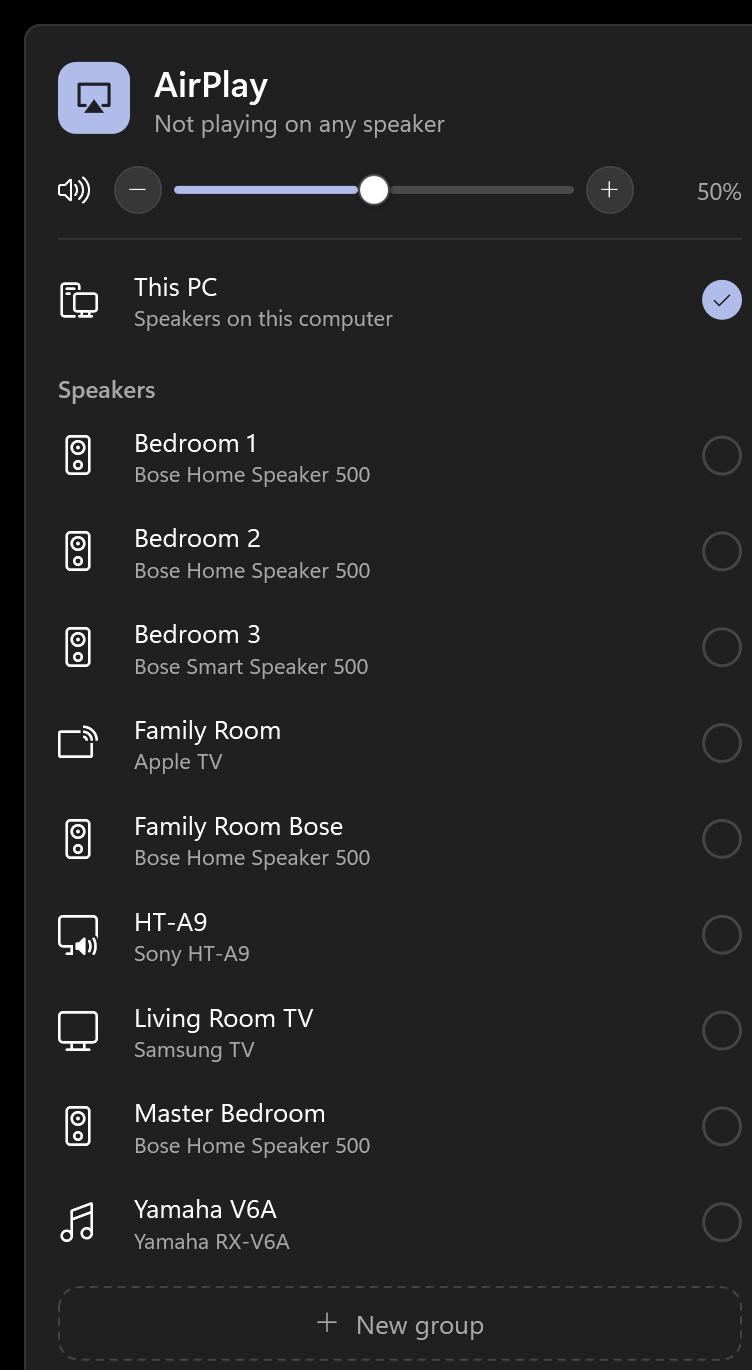
The tray icon opens a flyout shaped like the iPhone’s picker: a tick per device, a PIN box for one never paired, and Volume and Delay sliders. Unticking This PC mutes the PC’s own speakers, which otherwise play ahead of the AirPlay ones.
The Samsung that rejected every PIN
Most speakers played the first time. The Samsung Frame, a TV, asked for a PIN, and three PINs in a row failed. The debug log showed the TV’s answer:
airplay: Pairing step 2 response from 'Samsung The Frame 43' error: Device returned an authentication failureairplay: Raw response 0000 07 01 02 06 01 04My first guess was that the TV made a fresh PIN each time OwnTone connected, so the one I typed was already out of date. But a PIN sent while nothing else was talking to the TV failed too. So I read the PIN flow in OwnTone’s airplay.c, which has two steps.
- OwnTone connects to the TV and asks it to show a PIN. Then it closes that connection.
- When you type the PIN, OwnTone opens a new connection and sends the PIN there.
Stock OwnTone pairs Apple TVs this way, so they accept a PIN on a new connection. The Samsung seems to tie the PIN to the connection that asked for it, which fits all three failures. I can’t see inside the TV, so this is an inference from the log and the code, and the fix below is what backs it up.

The patch keeps the first connection open and remembers it. When the PIN arrives, OwnTone sends it on that waiting connection, and falls back to a new one as before if it has gone. The core of it:
// Some receivers (e.g. Samsung TVs) only accept the PIN on the connection that// asked them to display it, so the session is kept open for device_authorizestatic voidsession_pin_started(struct airplay_session *session)...  { AIRPLAY_SEQ_PIN_START, session_success, session_failure },  { AIRPLAY_SEQ_PIN_START, session_pin_started, session_failure },...airplay_device_authorize(struct output_device *device, const char *pin, int callback_id){  struct airplay_session *session;
  // Make a session so we can communicate with the device  session = session_make(device, callback_id);  if (!session)    return -1;  for (session = airplay_sessions; session; session = session->next)    {      if (session->pin_pending && session->device_id == device->id)  break;    }
  if (session)    {      session->pin_pending = false;      session->callback_id = callback_id;      outputs_device_session_add(device->id, session);    }  else    {      // Make a session so we can communicate with the device      session = session_make(device, callback_id);      if (!session)  return -1;    }
The rest of the patch stops that waiting connection from being cleaned up or detached from its device while it waits. I rebuilt, asked the TV for a new PIN and typed it in. The log showed all three pairing steps and then:
airplay: Pair setup stage complete, saving authorization keyOwnTone now marks the Frame as paired, so the PIN is asked for once. I have only tested this one TV.
Two speakers in step
With the Frame paired, I played a beep on the Frame and on Bedroom 1, a Bose speaker near it. OwnTone’s log showed both getting the same start position (3861907438) at the same moment on the PTP clock (1295.114 s). That is the shared clock at work.
By ear it was “almost one clean beep”, a pass for two makes with different internal delays. OwnTone accepts a delay between -2000 and +2000 ms for each speaker to close the rest, and the tray app has a slider for it.
The 2.25 second wait
AirPlay is not live. OwnTone sends the audio 2.25 seconds before it should be heard, so every speaker has time to receive it and start together. So the sound arrived about 2 seconds after the picture on the PC, fine for music, no good for video.
OwnTone has a setting for this head start, start_buffer_ms. Its config notes say the 2250 default is there because older AirPlay devices hardcode it, and that 500 ms may work. I lowered it to 1000, and my two Bose speakers went silent.
The app, the pipe and OwnTone all reported they were working. The shorter buffer was the only change, and putting 2250 back fixed it.
What the delay slider can reach
A negative delay pulls the sound earlier, but at -2000 it was still about half a second behind the picture. So I raised OwnTone’s limit for a test and measured with a microphone.
The app plays a short rising tone through one speaker and times how long the PC’s microphone takes to hear it. Each reading is taken twice and counts only when the two agree within 40 ms. These results for one speaker (Bedroom 2) were taken after the latency fixes in the next section:
| Delay setting | What happened |
|---|---|
| -2500 ms | no sound |
| -2000 ms | plays, 440 ms after the PC |
| +2000 ms | plays, 4,410 ms after the PC |
| +2500 ms | no sound |
An earlier run with the limit at 10 seconds agreed: +1500 and +2000 ms played, and +2500, +3500, +5000 and +9000 ms were silent. The microphone hears it faintly, so I tried -2500 by ear too: still silent. I put the limit back at OwnTone’s ±2000.
My reading of why, which is reasoning rather than measurement: OwnTone keeps back a minimum of 250 ms for the speaker, and 2250 minus 250 is the 2000 ms a negative delay can take away. Going further asks the speaker to play audio it hasn’t received yet. On the positive side, this speaker went silent once it had to hold more than about 2 seconds of extra audio.
From about 710 ms to about 340 ms
At -2000, two microphone runs on Bedroom 2 gave 706 and 717 ms. A debug build of OwnTone put about 250 ms of that down to the minimum it keeps back for the speaker, which can’t go. The rest came from three places.
- The app waited for a timer. It sent audio in 20 ms blocks on a timer, padding with silence when a block came up short. It now writes the audio the moment Windows hands it over, and sends silence only while Windows is playing nothing.
- The loopback was read slowly. NAudio’s loopback capture uses a fixed 100 ms buffer, and it is read every half buffer, so about every 50 ms. A small subclass asks for a 20 ms buffer, so it is read about every 10 ms.
- OwnTone’s input held a backlog. Its input buffer holds about 2 seconds by default. After a pause, playback resumes once that much has built up, and for a live pipe it stays as delay. I patched it to hold 0.3 seconds.
The first two changes are in the app’s audio sender.
// Loopback is polled every half buffer, so a short buffer gets the audio out soonerprivate const int CaptureBufferMilliseconds = 20;// ...private sealed class LoopbackCapture(MMDevice device) : WasapiCapture(device, false, CaptureBufferMilliseconds){ protected override AudioClientStreamFlags GetAudioClientStreamFlags() => AudioClientStreamFlags.Loopback | base.GetAudioClientStreamFlags();}The third is in OwnTone.
// The below gives us room to buffer 2 seconds of 48000/16/2 audio.#define INPUT_BUFFER_THRESHOLD STOB(96000, 16, 2)// The below gives us room to buffer 0.3 seconds of 48000/16/2 audio. Playback// resumes after an underrun once this much is buffered, and for a live pipe// that amount stays as delay, so it is kept small (upstream uses 2 seconds).#define INPUT_BUFFER_THRESHOLD STOB(14400, 16, 2)After the changes, three runs in a row measured 349, 337 and 337 ms.
The bug that scrambled my measurements
Before that steady result, readings at the same setting ranged from 474 ms to 5.2 seconds. Each time I stopped the app to install a new build, its cat > pipe process kept running, so the new app added a second writer to the same pipe. The app now clears any leftover writers when it starts, with pkill -f "cat > /srv/music/pc-audio" inside WSL.
A second bug: OwnTone could sit stopped, with every speaker silent, if it started while audio was already flowing. A five-second watchdog now restarts playback.
What I’d pin to the wall
- AirPlay sending is discovery, pairing, encryption and a shared clock. Borrow the engine if you can.
- A browser extension can’t open the connections AirPlay needs. The workable shape is a helper program on the PC.
- WSL needs mirrored networking to see the home network, and it shuts down when idle unless something is running in it.
- When a device rejects every PIN, check which connection carried it. Some TVs seem to tie the PIN to the connection that asked for it.
- A speaker’s delay range is set by the speaker as much as the software. Measure with a microphone before you widen a limit.
- Kill leftover processes before you measure anything. Two writers on one pipe look like a latency bug.
Next: replacing OwnTone
This setup carries a Linux system, a build step and two patches. In part 2 I replace OwnTone with a native C# engine inside the app, and make speaker groups appear on an iPhone as if they were AirPlay speakers.