If you run a Sitecore XM Cloud site with a Next.js head on Vercel and you need it to work well for users in mainland China, you end up putting a China-based reverse proxy in front of everything. We used 21YunBox. Almost nobody writes about what that integration actually looks like in code, so here’s the walkthrough — how the pieces fit, what the app has to do differently, and the gotchas that only appear once the proxy is in the request path.
Table of contents
Open Table of contents
The baseline stack
Before the proxy, the setup is a fairly standard Sitecore XM Cloud headless site:
- Sitecore XM Cloud is the headless CMS. Content and layout come out of it over the Sitecore APIs.
- A Next.js head (the JSS app) renders the pages and is deployed on Vercel.
- The site is heavily multilingual — over a hundred locales via Next.js
i18n, includingzh-cn,zh-hk, andzh-tw.
A couple of Next.js config choices matter later. Static assets are served from a public URL via assetPrefix, and Sitecore paths (the content APIs and media library) are proxied through Next.js rewrites:
// next.config.js (simplified)
const nextConfig = {
  assetPrefix: publicUrl,
  i18n: {
    locales: ['en-us', 'en-gb', 'zh-cn', 'zh-hk', /* ...100+ more */],
    defaultLocale: 'default',
    localeDetection: false,
  },
  async rewrites() {
    return [
      { source: '/sitecore/api/:path*', destination: `${sitecoreApiHost}/sitecore/api/:path*` },
      { source: '/-/:path*',            destination: `${sitecoreApiHost}/-/:path*` }, // media
    ];
  },
};
Where the proxy fits
The first thing to understand is that China gets its own domain. The global site lives on the .com, whose DNS points straight at Vercel. The China site lives on a separate .cn domain — and its DNS does not point at Vercel. It points at 21YunBox, which terminates the request inside China and then proxies back to the Vercel origin.
So the same application serves two domains, but the path a request takes is completely different depending on which one it came in on. A .com request goes browser → Vercel. A .cn request goes browser → 21YunBox → Vercel. That extra hop is the source of everything else in this post.
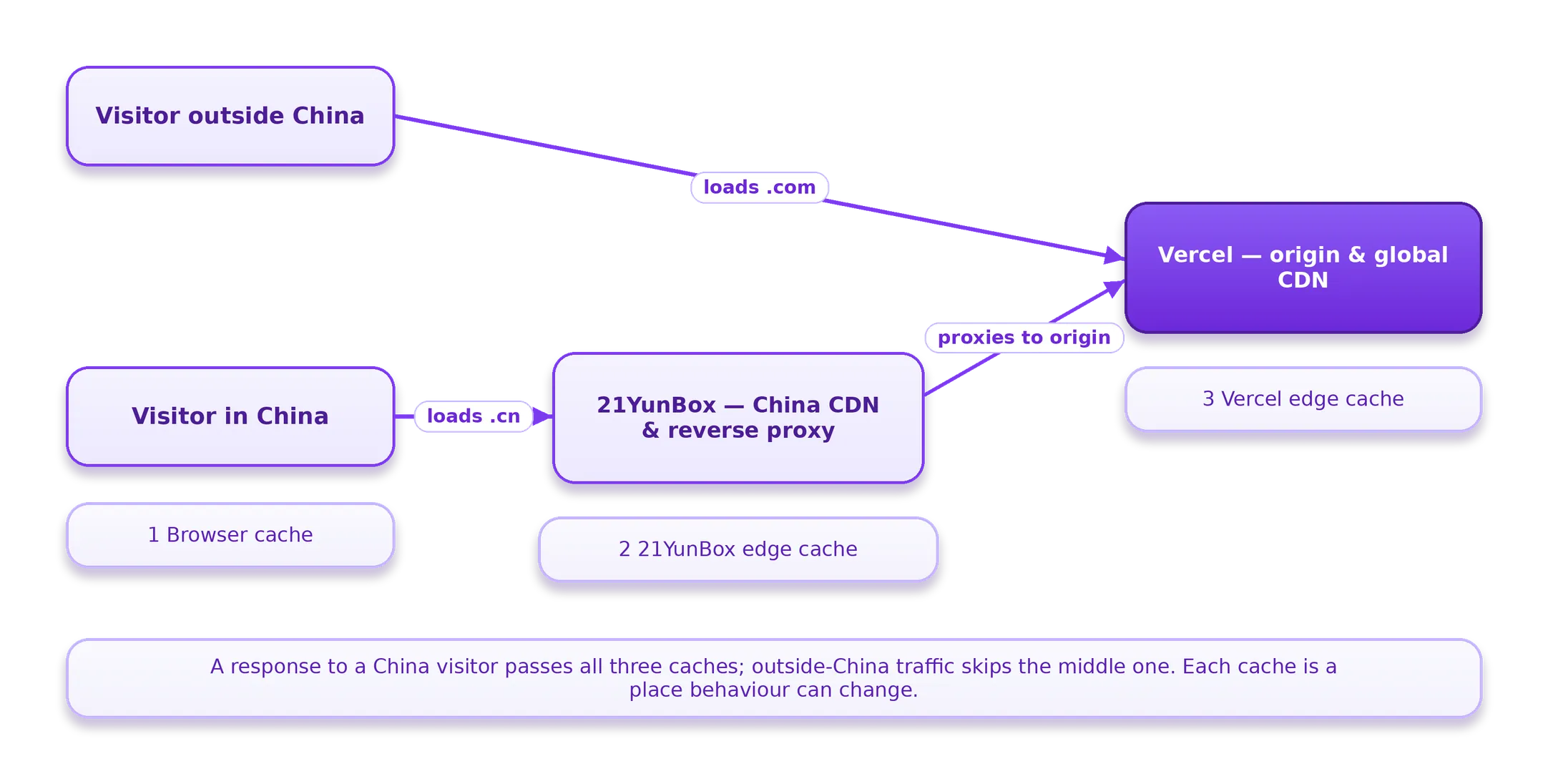
Because the .cn is fronted by the proxy, a user in China has three caches in the request path, and it pays to keep them straight:
- The browser cache, controlled by the
Cache-Controlheader the browser actually receives. - The 21YunBox edge cache, controlled by whatever the proxy decides to honour from the origin response.
- The Vercel edge cache, upstream of the proxy and largely irrelevant to Chinese users, because the proxy serves them before Vercel ever gets a look in.
The rest of the integration is really about one question: how does the app know a request came through the China proxy, and what does it do differently when it did?
How the app detects China traffic
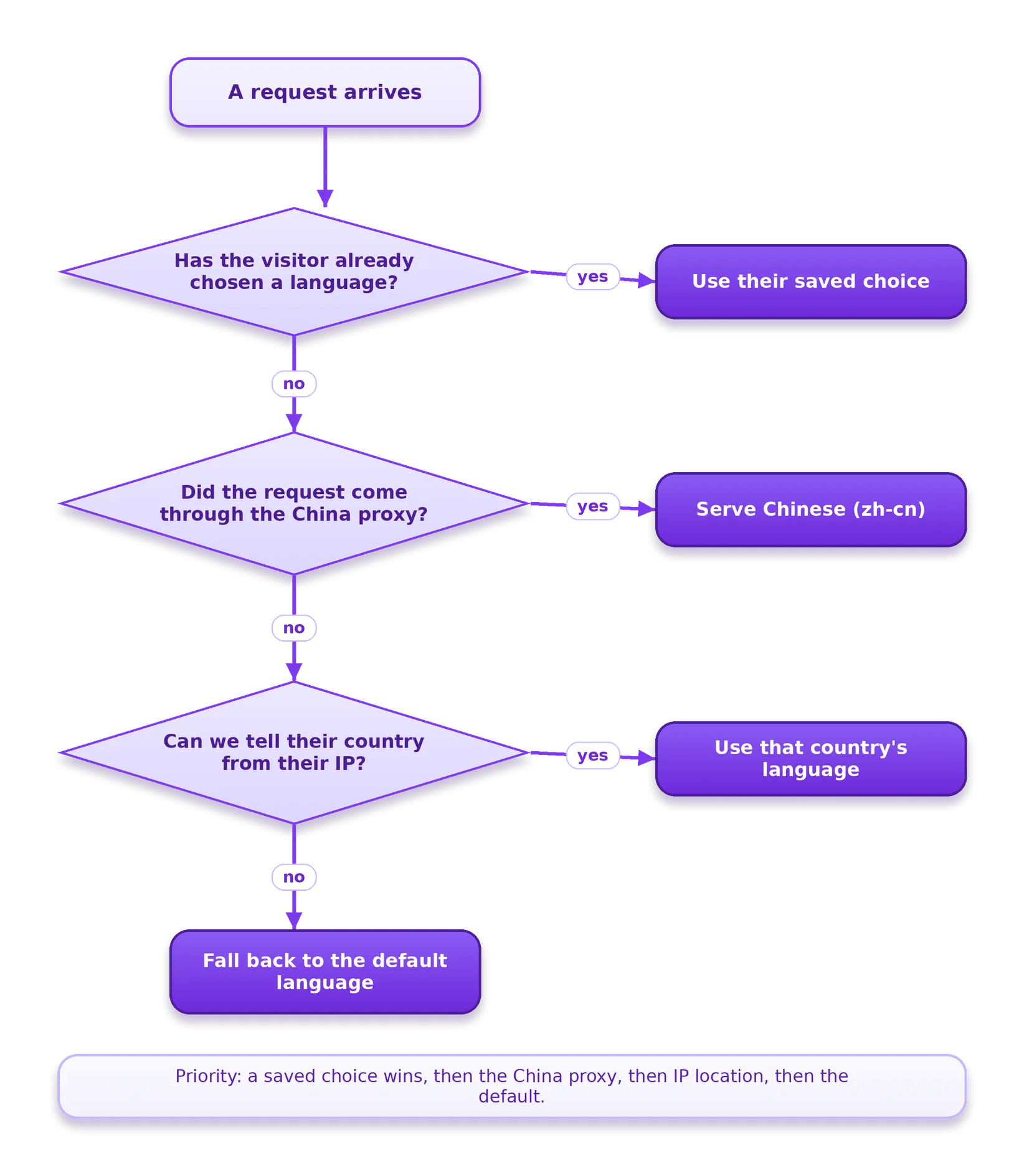
This is the heart of it. 21YunBox adds a custom header to every request it forwards — in our case x-from-21yb: true. The Next.js middleware reads that header and, when it’s present, forces the locale to zh-cn. It checks this before falling back to GeoIP, because the proxy is a more reliable signal than an IP lookup at that point.
// middleware locale resolution (simplified)
async function resolveLocale(req: NextRequest, prefs): Promise<string> {
  // 1. Respect an explicit user preference cookie first
  if (prefs.userPreferredLanguage) return prefs.userPreferredLanguage;

  // 2. If the request came through the China proxy, it's zh-cn
  const fromProxy = req.headers.get('x-from-21yb')?.toLowerCase() === 'true';
  if (fromProxy) return 'zh-cn';

  // 3. Otherwise fall back to GeoIP, then the default locale
  return (await runGeoIp(req)) ?? defaultLocale;
}
The order is the whole point: explicit preference, then the proxy header, then GeoIP. If you let GeoIP win over the proxy header you get flaky locale resolution for exactly the users you stood up the proxy for.
Sitemaps and robots across two domains
The same site answers on both the global .com and the China .cn, which makes the machine-readable files (robots.txt, sitemap.xml) the fiddly part.
Sitemaps are generated on a schedule rather than per request. Vercel cron jobs hit regeneration endpoints so the cached sitemap stays fresh without rebuilding it on every crawl:
// vercel.json (excerpt)
{
  "crons": [
    { "path": "/api/sitemap-regenerate-en",     "schedule": "0,15,30,45 0,4,8,12,16,20 * * *" },
    { "path": "/api/sitemap-regenerate-others",  "schedule": "0,15,30,45 2,6,10,14,18,22 * * *" },
    { "path": "/api/incrementalsitepublish",     "schedule": "0,15,30,45 * * * *" }
  ]
}
For China, the sitemap host has to be the .cn domain, not the global one. That’s handled with an environment-driven override: when the locale is zh-cn, the generator swaps the host for the China domain instead of the default public URL.
// sitemap host override (simplified)
const chinaOverride = process.env.NEXT_CHINA_DOMAIN_OVERRIDE
  ? new URL(process.env.NEXT_CHINA_DOMAIN_OVERRIDE)
  : undefined;

function hostFor(locale: string): URL {
  if (chinaOverride && locale === 'zh-cn') return chinaOverride;
  return defaultPublicUrl;
}
One more piece worth knowing: the middleware that injects security headers (Content-Security-Policy, Strict-Transport-Security, and friends) treats only real HTML page requests as “documents” and explicitly skips robots.txt, sitemap.xml, the API routes, and the Sitecore media paths. You don’t want a CSP stapled onto your sitemap.
// only add document headers to actual pages
const excluded = ['/api/', '/healthz', '/-/', '/sitemap.xml', '/robots.txt'];
if (excluded.some((p) => pathname.startsWith(p))) return response; // skip
Highlights: the issues we hit
Once the proxy is in front, three things broke that the framework assumes it controls. None of them showed up in normal QA from outside China — you only see them from inside the proxy’s path.
1. The proxy strips Cache-Control from static assets. Next.js serves hashed assets under _next/static/* with Cache-Control: public, max-age=31536000, immutable — a header it sets itself and won’t let you override, which is fine because the filenames are content-hashed. The proxy stripped that header before it reached the browser. With no caching instruction, the browser re-fetched every asset on every navigation, and those requests sailed through to the origin — so the proxy’s own edge wasn’t caching either. We confirmed it by comparing headers straight from Vercel (header present) against the same asset through the .cn domain (header gone), and by reading Vercel logs scoped to the Hong Kong region and the /_next/static/* path. Worth knowing: Vercel bills Fast Data Transfer the same whether a response is a cache hit or not, so this was a cost problem, not just a latency one. The real fix is on the proxy’s side; from your side, CDN-Cache-Control or moving _next/static to a different CDN via assetPrefix are the levers.
2. The proxy rewrites .com URLs to .cn — even inside robots.txt and sitemap.xml. The proxy’s optimiser treats response bodies as HTML and substitutes the domain so Chinese users stay on the China domain. Handy for pages, wrong for machine files: it rewrote the Sitemap: line in robots.txt and the URLs inside sitemap.xml. Because both domains share the same generated robots.txt, you can’t just disallow the broken .cn sitemap without hurting the .com. The clean fix was a proxy config change — add robots.txt and sitemap.xml to the rewrite exclusion list. Serving a host-aware robots.txt from Next.js doesn’t help, because the rewrite happens to the response body after your code runs.
3. The proxy follows redirects itself instead of passing them to the browser. When the app issued a 301 before the proxy’s own serving logic ran, the proxy followed the redirect as a fresh origin request rather than returning the 301 to the client — which can produce loops. With several redirect plugins running in middleware (static, media, display-name, and Sitecore redirects) ahead of locale normalization, where in the chain a redirect fires matters a lot once a proxy is involved.
The takeaway
A reverse proxy in front of a modern framework can quietly break three things the framework assumes it owns: client caching, the canonical URLs in your machine-readable files, and redirect semantics. The integration itself is small — a header the proxy sets, a locale rule, a host override — but the failure modes don’t show up from outside the region. Compare headers at the origin versus through the proxy, and read region-scoped logs, or you’ll be debugging blind.